Admin Pages Guide
This document describes the purpose, functionality, and common use cases for the system administration pages in the Image Factory admin dashboard.
Access: /admin/*
Audience: system administrators
Navigation: left sidebar within the admin dashboard
Snapshot
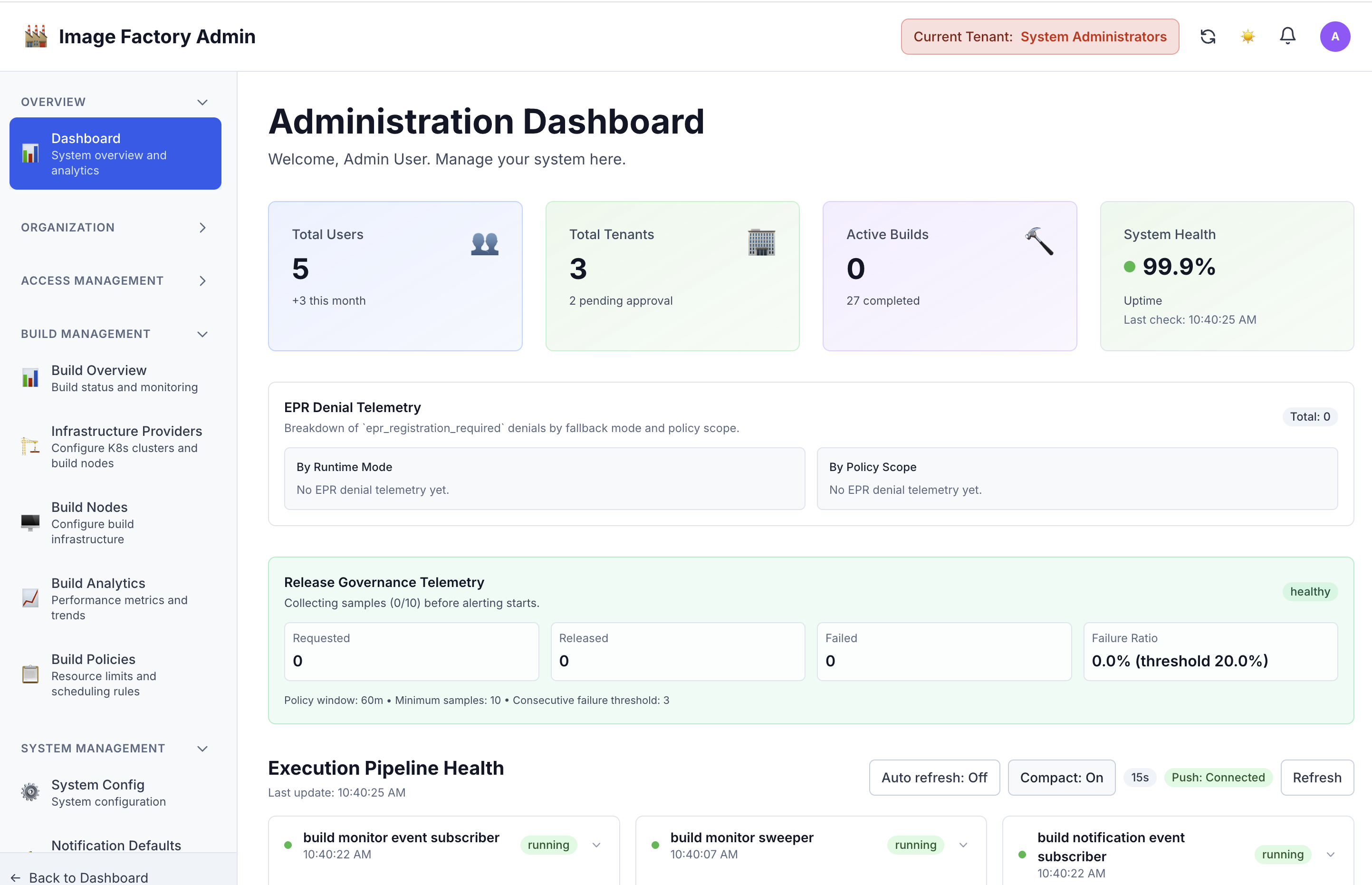
Administration dashboard:
Admin Navigation Map
flowchart TD
    A[Admin Dashboard] --> B[Tenant Management]
    A --> C[User Management]
    A --> D[Roles And Permissions]
    A --> E[System Configuration]
    A --> F[Build Monitoring]
    A --> G[Audit Logs]
Common Admin Workflow
sequenceDiagram
    participant Admin
    participant UI as Admin Console
    participant API as Backend API
    participant Services as Platform Services

    Admin->>UI: Review system status
    Admin->>UI: Open tenant, user, or config page
    UI->>API: Submit management action
    API->>Services: Apply update
    Services-->>API: Return result
    API-->>UI: Show updated state and audit outcome
Admin Dashboard Page
Route: /admin/ or /admin/dashboard
Component: AdminDashboardPage.tsx
Purpose
The main landing page for system administrators. Provides a high-level overview of the entire system's health, statistics, and quick access to common administration tasks.
Key Features
-
System Statistics Cards:
- Total system users count
- Total active tenants count
- Active builds currently running
- System health status (healthy/warning/critical)
- System uptime duration
- Last health check timestamp
-
Quick Action Links:
- Shortcuts to most-used admin pages
- Fast navigation to common tasks
- One-click access to critical management areas
-
System Health Monitoring:
- Real-time system status indicator
- Performance metrics
- Error/warning notifications
- Health trend visualization
Use Cases
- System admin starts their shift - quick status check
- Troubleshooting system issues - see health status immediately
- Executive summary - show stakeholders system status
- Quick navigation - jump to specific admin task
Data Displayed
- Total Users (count)
- Total Tenants (count)
- Active Builds (count)
- System Health Status (healthy/warning/critical)
- System Uptime (duration)
- Last Health Check (timestamp)
Tenant Management Page
Route: /admin/tenants
Component: TenantManagementPage.tsx
Purpose
System-wide tenant management. View, create, edit, and delete all tenants in the system. This is the master control for all tenant organizations.
Key Features
-
List all tenants in the system
- Table view with sortable columns
- Search by tenant name/ID
- Filter by status (active/inactive/deleted)
- Pagination for large tenant lists
-
Tenant operations:
- Create new tenant
- Edit tenant information
- View tenant details
- Deactivate/reactivate tenant
- Delete tenant (with confirmation)
- Export tenant list
-
Tenant information displayed:
- Tenant name and ID
- Tenant status
- Number of projects
- Number of users
- Created date
- Last modified date
- Tenant admin/owner
Admin Actions
- Create new tenant
- Edit tenant metadata
- Change tenant status
- Manage tenant settings
- View tenant usage statistics
- Delete tenant (with cascade warnings)
Use Cases
- New tenant onboarding - create account
- Tenant deactivation - pause services
- Tenant deletion - remove from system
- Tenant audit - review all tenants
- Usage reporting - gather tenant statistics
- Support - find tenant information quickly
Related Page
- Tenant Details (
/admin/tenants/:id) - Deeper dive into single tenant
User Management Page
Route: /admin/users
Component: UserManagementPage.tsx
Purpose
System-wide user account management. Manage all user accounts, reset passwords, change roles, deactivate/activate users, and handle user lifecycle.
Key Features
-
List all system users
- Table with searchable columns
- Filter by role, status, tenant
- Sort by name, email, created date
- Pagination support
-
User operations:
- Create new system user
- Edit user information
- Reset user password
- Change user role/permissions
- Activate/deactivate user account
- Delete user account
- View user activity history
-
User information displayed:
- User name and email
- User roles and tenant assignments
- Account status (active/inactive/locked)
- Last login timestamp
- Created date
- MFA status
- User groups
Admin Actions
- Create user accounts
- Reset passwords for locked users
- Promote/demote user roles
- Disable/enable accounts
- Unlock locked accounts
- Change email addresses
- Manage user groups/teams
- Review user activity
Use Cases
- New user setup - create account and assign role
- Password reset - help user regain access
- Role promotion - elevate user responsibilities
- Account deactivation - remove user access
- User audit - review all accounts
- Security - identify suspicious activity
- Compliance - generate user reports
Security Features
- Password reset without revealing current password
- Account lockout detection
- Login attempt tracking
- Permission escalation logging
- MFA status visibility
User Invitations Page
Route: /admin/users/invitations
Component: UserInvitationsPage.tsx
Purpose
Manage pending user invitations. Send new invitations, track invitation status, resend expired invitations, and clean up old invitations.
Key Features
-
Pending invitations list
- Email address
- Sent date and time
- Expiration status
- Acceptance status
- Invited by admin
- Tenant assigned
-
Invitation operations:
- Send new invitation
- Resend expired invitation
- Cancel pending invitation
- Bulk invite users
- Set invitation expiration
- Track invitation status
-
Invitation statuses:
- Pending - awaiting user acceptance
- Accepted - user completed signup
- Expired - invitation link expired
- Revoked - admin cancelled
- Failed - delivery error
Admin Actions
- Send individual invitations
- Bulk invite users (CSV upload)
- Resend pending invitations
- Cancel invitations
- Customize invitation message
- Set custom expiration dates
- Track who was invited
- Audit invitation history
Use Cases
- Team onboarding - invite multiple users at once
- Resend expired invitations - user didn't receive email
- Monitor signup process - track pending invitations
- Clean up old invitations - remove expired entries
- Audit trail - see who invited whom and when
- Bulk operations - import user list and send invites
Email Template
- Customizable invitation email
- Includes signup link
- Expiration notice
- Role information
- Company/tenant information
Roles Management Page
Route: /admin/roles
Component: RoleManagementPage.tsx
Purpose
Define and manage system roles. Create custom roles, modify role definitions, assign permissions to roles, and manage role hierarchy.
Key Features
-
Built-in roles:
- System Administrator
- Tenant Owner
- Project Admin
- Developer
- Operator
- Viewer
- Custom roles
-
Role management operations:
- Create new role
- Edit role name and description
- Define role permissions
- Set role hierarchy
- View role usage (how many users)
- Delete unused roles
- Clone existing role
-
Role information displayed:
- Role name and ID
- Role description
- Permissions assigned
- User count with role
- Created date
- Last modified
- Role visibility (system/custom/tenant)
Admin Actions
- Create custom roles
- Modify role permissions
- Change role hierarchy
- Set role visibility
- Archive old roles
- Migrate users between roles
- View permission inheritance
- Document role purposes
Use Cases
- New role creation - define job function
- Permission management - assign capabilities to role
- Role audit - review who has what permissions
- Security policy - enforce least privilege
- Organization change - update roles
- Compliance - document role purposes
- Testing - create test roles
Permission System
- Permission-based (not role-based)
- Granular permission assignment
- Permission inheritance
- Role templates
- Permission documentation
Permissions Page
Route: /admin/permissions
Component: PermissionManagementPage.tsx
Purpose
Assign specific permissions to roles. Link available permissions to system roles, manage permission grants, and control access.
Key Features
-
Permission matrix view:
- Roles on one axis
- Permissions on other axis
- Checkboxes for grant/revoke
- Bulk operations
-
Permission operations:
- Grant permission to role
- Revoke permission from role
- Batch grant permissions
- Batch revoke permissions
- View permission dependencies
- Copy permissions from role
- Export permission matrix
-
Permission information:
- Permission name and code
- Permission description
- Permission category
- Related permissions
- Risk level (low/medium/high)
- Audit trail
Admin Actions
- Grant permissions to roles
- Revoke permissions from roles
- View permission inheritance
- Copy permission sets between roles
- Bulk permission changes
- Review permission impact
- Audit permission changes
Use Cases
- Role creation - assign permissions to new role
- Security audit - review who has what permissions
- Access control - restrict sensitive actions
- Compliance - prove permission governance
- Testing - set up test permissions
- Troubleshooting - find why user can/can't do something
Permission Categories
- Tenant management
- User management
- Build management
- Project management
- Infrastructure management
- System configuration
- Audit logging
- Billing/usage
Permission Definitions Page
Route: /admin/permission-definitions
Component: PermissionDefinitionsPage.tsx
Purpose
Manage the system's permission definitions. Define what permissions exist in the system, their descriptions, categories, and risk levels. This is the master list of all available permissions.
Key Features
-
Permission definitions list:
- All available permissions
- Permission code/key
- Human-readable name
- Description
- Category/module
- Risk level
- Usage count
-
Definition operations:
- View all permissions
- Search permissions
- Filter by category/risk
- Add new permission (system admin)
- Edit permission description
- Archive unused permissions
- Export permission list
-
Permission attributes:
- Unique permission code
- Display name
- Description
- Category (tenant, user, build, etc)
- Risk level (low/medium/high/critical)
- Creation date
- Last modified
- Usage statistics
Admin Actions
- Create new system permission (rare)
- Document permissions
- Review permission structure
- Audit permission usage
- Plan new permission needs
- Export for compliance
- Review permission dependencies
Use Cases
- System audit - understand all system permissions
- Documentation - publish permission reference
- Compliance - prove what permissions exist
- Planning - identify missing permissions
- Training - educate admins on capabilities
- Architecture review - validate permission design
- Export - provide to compliance team
Permission Hierarchy
- System-level permissions
- Tenant-level permissions
- Project-level permissions
- Object-level permissions
- Permission inheritance chains
System Configuration Page
Route: /admin/system-config
Component: SystemConfigurationPage.tsx
Purpose
Configure system-wide settings and parameters. Adjust global configuration, feature flags, limits, timeouts, and system behavior.
Key Features
-
Configuration sections:
- System settings
- Feature flags
- Rate limits
- Timeout values
- Storage settings
- Email configuration
- Webhook settings
- API settings
-
Configuration operations:
- View all settings
- Edit configuration values
- Save configuration
- Validate settings
- Reset to defaults
- Export configuration
- Import configuration
- Version control settings
- Test connections: Validate LDAP, SMTP, and external service configurations
-
Settings categories:
- Build system: Build timeout, max parallel builds, build queue size
- Storage: Max file size, storage location, retention policy
- Email: SMTP settings, sender email, templates
- Security: Session timeout, password policy, 2FA settings
- Performance: Cache settings, rate limits, worker pool size
- Features: Feature flags and staged rollout options
- External Services: API endpoints, authentication, connection testing
Admin Actions
- Change system configuration
- Enable/disable features
- Adjust limits and quotas
- Configure integrations
- Set timeouts and retries
- Save configuration backups
- Revert configuration changes
Use Cases
- Initial system setup - configure for organization
- Performance tuning - adjust system behavior
- Feature rollout - enable new features gradually
- Security hardening - change security settings
- Integration setup - configure external systems
- Compliance - adjust retention policies
- Troubleshooting - change timeouts/retries
Configuration Examples
- Max concurrent builds: 50
- Build timeout: 3600 seconds
- Max artifact size: 5GB
- Session timeout: 30 minutes
- Email SMTP server: smtp.company.com
- Enable 2FA: true
Tool Management Page
Route: /admin/tools
Component: ToolManagementPage.tsx
Purpose
Configure available build tools system-wide. Enable/disable build methods, manage tool versions, set tool-specific configurations, and manage tool availability per tenant.
Key Features
-
Tool availability management:
- Enable/disable build tools
- Select which tools available
- Set default tool
- Mark tools for staged rollout
-
Tool configuration:
- Tool version settings
- Tool parameters
- Tool-specific limits
- Resource allocation per tool
-
Per-tenant tool management:
- Different tools per tenant
- Tenant-specific versions
- Tenant-specific parameters
- Trial access to new tools
-
Tools available:
- Docker - Standard container builds
- Buildx - Multi-platform Docker builds
- Kaniko - Lightweight Docker builds
- Packer - Infrastructure image builds
- Nix - Nix package manager builds
Admin Actions
- Enable/disable tools
- Set tool versions
- Configure tool limits
- Assign tools to tenants
- Set default tool per tenant
- Test tool availability
- Monitor tool health
- Update tool versions
Tool Settings
- Tool binary/version
- Configuration options
- Resource limits
- Timeout values
- Retry policies
- Logging level
- Health check frequency
Use Cases
- New tool rollout - enable tool for all/some tenants
- Tool decommissioning - disable end-of-life tool
- Tool testing - trial a new tool for a subset of tenants
- Performance tuning - adjust tool parameters
- Compliance - disable disallowed tools
- Feature rollout - enable features per tenant
- Resource management - limit per-tenant tool usage
Tool Status Monitoring
- Tool availability
- Tool health check
- Tool usage statistics
- Error rates per tool
- Performance metrics
- Last usage time
- Version information
Build Management Page
Route: /admin/builds
Component: AdminBuildsPage.tsx
Purpose
System-wide build monitoring and management. View all builds across all tenants, monitor build health, manage long-running builds, and debug build issues.
Key Features
-
System-wide build monitoring:
- All builds across all tenants
- Real-time build status
- Build progress tracking
- Build timeline view
- Build resource usage
-
Build list with filters:
- Filter by tenant
- Filter by status (running, completed, failed, queued)
- Filter by build method
- Filter by date range
- Search by build ID/name
- Sort by status, duration, date
-
Build information displayed:
- Build ID and name
- Tenant and project
- Status (running/success/failed/queued)
- Build method used
- Start and end time
- Duration
- Resource usage
- Error messages (if failed)
Admin Actions
- View build details
- Cancel running builds
- Force-restart failed builds
- View build logs
- Download artifacts
- Diagnose build failures
- Optimize build performance
- Resource allocation
Use Cases
- System monitoring - overall build health
- Troubleshooting - investigate failed builds
- Performance analysis - identify slow builds
- Resource optimization - balance build load
- Tenant support - help tenant debug builds
- Capacity planning - understand usage patterns
- SLA monitoring - track build success rates
Build Statistics
- Total builds (today/week/month)
- Success rate
- Average build duration
- Failed builds count
- Queue depth
- Resource utilization
- Tenant comparison
Image Catalog Page
Route: /admin/images
Component: ImagesPage.tsx (in admin context)
Purpose
System-wide image catalog management. Browse, approve, and manage all container images available in the system. Control image versions and security settings.
Key Features
-
Image browsing:
- List all images
- Search by name/tag
- Filter by status (approved/pending/rejected)
- Filter by type (docker/oci/other)
- Sort by popularity, date, size
-
Image information:
- Image name and tags
- Image size
- Creation date
- Usage count
- Last used
- Approver
- Security scan status
- Vulnerabilities
-
Image operations:
- Approve images for use
- Reject images (block usage)
- Deprecate images (mark old)
- Archive images
- Update image metadata
- View image details
- Download image
Admin Actions
- Approve images for company use
- Reject/block dangerous images
- Set image deprecation dates
- Manage image versions
- Set image security policies
- Review security scans
- Manage image registry access
Security Management
- Security scan results
- Vulnerability tracking
- Image signing
- Registry authentication
- Image signature verification
- Supply chain security
Use Cases
- Image approval - vet images before use
- Security compliance - ensure approved images only
- Image maintenance - update and deprecate old images
- Vulnerability management - track CVEs in images
- Audit trail - who used what images
- Standardization - promote standard images
- Licensing - track image licenses
Audit Logs Page
Route: /admin/audit-logs
Component: AuditLogsPage.tsx
Purpose
View comprehensive audit trail of all system activities. Track what happened, when it happened, who did it, and what changed. Critical for compliance, security, and troubleshooting.
Key Features
-
Complete audit trail:
- All system events logged
- User actions
- Configuration changes
- Permission changes
- Tenant operations
- Build events
- Security events
-
Audit log information:
- Event timestamp
- User who performed action
- Action type
- Resource affected
- Changes made
- IP address
- Browser/client info
- Result (success/failure)
-
Audit log filters:
- Filter by date range
- Filter by user
- Filter by action type
- Filter by resource
- Filter by result
- Search by details
- Filter by tenant
-
Audit log features:
- Real-time log streaming
- Detailed change tracking
- Before/after values
- JSON export
- CSV export
- Advanced search
- Full-text search
Admin Actions
- View all audit logs
- Search logs
- Filter logs
- Export logs
- Analyze patterns
- Detect suspicious activity
- Review change history
- Generate reports
Event Types Logged
- User login/logout
- User creation/deletion
- Role assignments
- Permission changes
- Tenant operations
- Build execution
- Configuration changes
- Security events
- Failed access attempts
- Password resets
- API key generation
- Data access
Use Cases
- Security investigation - find malicious activity
- Compliance audit - prove audit trail exists
- Forensics - investigate incident
- Change tracking - who changed what when
- Performance analysis - understand system load
- Training - show security importance
- Troubleshooting - understand event timeline
- Compliance reporting - generate audit reports
Audit Report Features
- Exportable reports
- Filterable data
- Sortable columns
- Date range selection
- User attribution
- Change details
- Legal hold support
- Long-term retention
Admin Page Quick Reference
By Frequency of Use
-
Daily Use
- Admin Dashboard - status check
- Audit Logs - monitor activities
- Build Management - monitor builds
-
Weekly Use
- User Management - user lifecycle
- User Invitations - new team members
- Tenant Management - tenant status
-
Monthly Use
- System Configuration - settings review
- Tool Management - update tools
- Roles & Permissions - policy review
-
As Needed
- Permission Definitions - reference
- Image Catalog - image approval
- Tenant Details - deep dive
Admin Page Selection Guide
If you need to...
| Task | Go To |
|---|---|
| See system overview | Admin Dashboard |
| Manage users | User Management |
| Invite new users | User Invitations |
| Define roles | Roles Management |
| Assign permissions | Permissions |
| Check available permissions | Permission Definitions |
| Configure system | System Configuration |
| Manage build tools | Tool Management |
| Monitor all builds | Build Management |
| Approve images | Image Catalog |
| Check activity history | Audit Logs |
| Manage tenants | Tenant Management |
| View tenant details | Tenant Details |
Operating Guidance
System administrators typically use these pages for four categories of work:
- daily operational visibility across tenants, users, and builds
- configuration and rollout management for platform capabilities
- security and access governance, including roles, permissions, and audit review
- support and investigation workflows when a tenant or build requires intervention
Use this guide as a navigation reference, then move into the page-specific sections above for details.