Local Development Setup
This guide explains how to stand up the Image Factory stack locally for development, evaluation, and QA.
Prerequisites
- Go 1.21+
- Node.js 18+
- PostgreSQL 15+
- Redis 7+
- Podman & Podman Compose
Quick Start
- Clone and enter the repository.
- Check required tools.
- Install dependencies.
- Start dev environment.
flowchart LR
    A[Clone Repository] --> B[Check Tools]
    B --> C[Install Dependencies]
    C --> D[Start Development Stack]
    D --> E[Open Frontend]
    D --> F[Verify Backend]
    D --> G[Test Mailpit And Supporting Services]
git clone https://github.com/<your-org>/image-factory.git
cd image-factory

make check-tools
make install
make dev
Access Points
- Frontend:
http://localhost:3000 - Backend API:
http://localhost:8080 - Email Testing:
http://localhost:8025
Login notes:
- Sample configuration files in this repository use scrubbed placeholder credentials.
- For a working local login, use the credentials created by your local seed/setup flow or the values configured in your non-public local environment files.
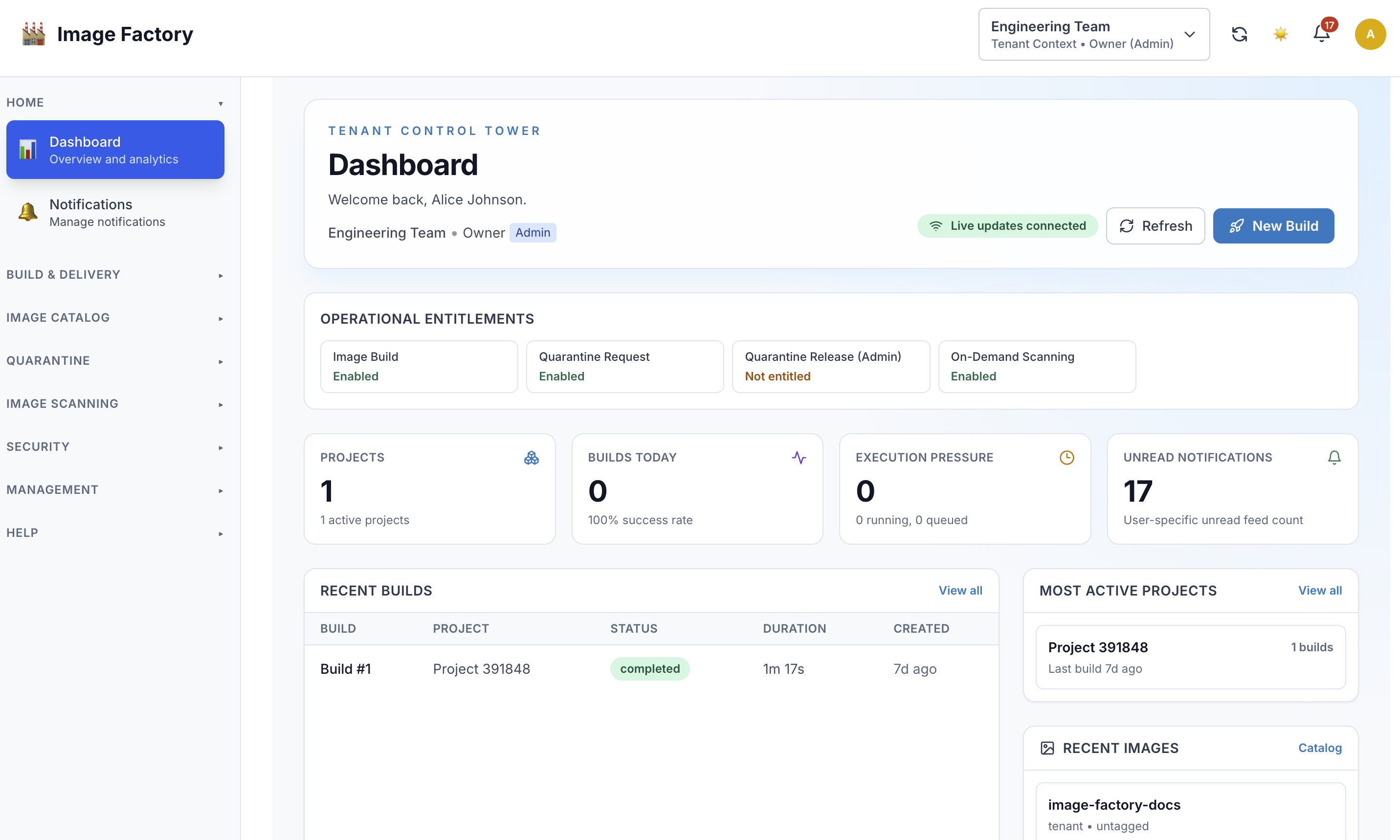
Example tenant dashboard after startup:
Local Service Layout
flowchart TD
    A[Frontend UI] --> B[Backend API]
    B --> C[PostgreSQL]
    B --> D[Redis]
    B --> E[Dispatcher]
    B --> F[Email Worker]
    B --> G[Notification Worker]
    B --> H[External Tenant Service]
    B --> I[GLAuth LDAP]
    F --> J[Mailpit]
Development Services (What to Run + Why)
Use these to mirror the full local environment. You can start them individually or via scripts/start-all-services.sh.
| Service | Purpose | Default Command | Health/URL |
|---|---|---|---|
| Backend API | Core API, auth, builds, dispatcher wiring | go run cmd/server/main.go --env ../.env.development |
http://localhost:8080 |
| Frontend | UI for admin/tenant workflows | npm run dev (from frontend/) |
http://localhost:3000 |
| Dispatcher | Claims queued builds and starts executions | go run ./cmd/dispatcher --env .env.development |
metrics: GET /api/v1/admin/dispatcher/metrics |
| Email Worker | Sends emails from queue | go run cmd/email-worker/main.go --env ../.env.development |
http://localhost:8081/health |
| Notification Worker | Processes notification events | go run cmd/notification-worker/main.go --env ../.env.development |
http://localhost:8083/health |
| External Tenant Service | Mock external tenant API | go run cmd/external-tenant-service/main.go |
http://localhost:8082/api/tenants |
| Mailpit | Local SMTP inbox for testing | mailpit --smtp 127.0.0.1:1025 --listen 127.0.0.1:8025 |
http://localhost:8025 |
| Redis | Cache/session storage (if enabled) | redis-server /usr/local/etc/redis.conf |
default Redis port |
| GLAuth LDAP | Local LDAP for auth testing | ~/glauth -c ldap-config.cfg |
ldap://127.0.0.1:3893 |
Notes:
- The
scripts/start-all-services.shscript starts most of these and logs tologs/. - NATS can be enabled via config if you want event transport beyond in-process bus.
Recommended First Checks
After the stack is running:
- Open the frontend and confirm the main dashboard loads.
- Verify the backend health endpoint responds.
- Confirm Mailpit is reachable if email flows are part of your test path.
- Start the dispatcher if you want queued builds to execute.
Resetting the Environment (Database + Seed)
sequenceDiagram
    participant Dev as Developer
    participant Script as reset-database.sh
    participant DB as PostgreSQL
    participant Seeders

    Dev->>Script: Run reset
    Script->>DB: Drop and recreate dev database
    Script->>DB: Apply migrations
    Script->>Seeders: Run essential and optional seeders
    Seeders-->>DB: Insert baseline data
    Script-->>Dev: Local environment ready
Use the reset script to drop/recreate the dev DB, apply migrations, and seed data:
./scripts/reset-database.sh
What it does:
- Drops and recreates
image_factory_dev - Runs migrations
- Seeds essential data
- Seeds optional demo data when available in your local setup
- Seeds email templates
- Seeds external services
- Seeds essential config
If you want to run steps manually, see the script: scripts/reset-database.sh.
Seeding Essential + Demo Data
These are the primary SQL seed files used by the reset script:
psql -h localhost -U postgres image_factory_dev < scripts/seed-essential-data.sql
Additional seeders:
go run ./backend/cmd/email-template-seeder --env .env.development
go run ./backend/cmd/external-service-seeder --env .env.development
go run ./backend/cmd/essential-config-seeder --env .env.development
Dispatcher
go run ./cmd/dispatcher --env .env.development
Run a single tick:
go run ./cmd/dispatcher --env .env.development --once
Metrics:
GET /api/v1/admin/dispatcher/metrics
Useful Commands
make dev
make dev-logs
make dev-stop
make dev-restart
make dev-clean

make backend-build
make backend-test
make backend-lint
make backend-format

make frontend-build
make frontend-test
make frontend-lint
make frontend-format